Blossom - Plant Identifier
- 4.4
- Rating
- 5.00M
- Installs
- Free
- Price

 Analysis by App-foxy
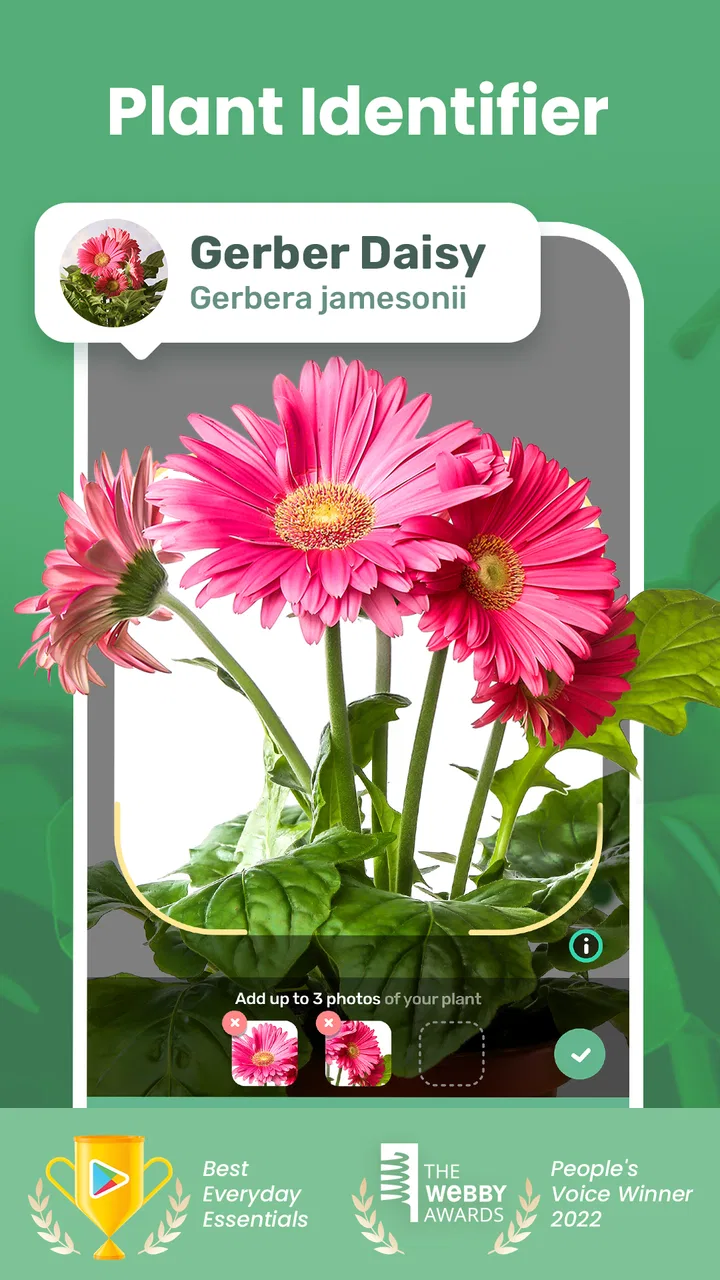
I started using Blossom - Plant Identifier with a simple household problem: several plants on a windowsill, a few unlabeled pots, and no agreement about which one needed water next. The app, developed by Mosaic Srl, is designed for identifying plants, flowers, and trees from photos, while also helping users remember care tasks. That combination makes it more useful than a one-time identification tool, especially when plant care is shared between people.
My first impression was that Blossom works best as a practical reference for everyday plant owners rather than as a replacement for a botanist or a serious horticulture database. Taking a picture is approachable, the education angle is clear, and the care reminders can turn vague good intentions into a repeatable routine. I also found that its value depends heavily on how carefully I take the photo and how much I check the suggested information before acting on it.
It is a free education app for Everyone, with optional in-app purchases ranging from $0.99 to $86.99 per item. Its current version is 1.56.4, and it runs on Android 7.0 or later. With an average rating of 4.4 from around 186 thousand ratings and more than 5 million installs, it has clearly reached a large audience. Those figures suggest broad appeal, but they do not remove the need to decide whether its identification and reminder style suit the way your household actually looks after plants.
You May Also Like

 Blood Strike: 2.5 Anniversary
Blood Strike’s Loadouts Turn Every Drop Into a Tactical Gamble
A close look at Blood Strike’s custom loadouts: how fast access to signature weapons reshapes its battle royale rhythm, rewards preparation, and narrows the gap between fights.

 Pandora - Music & Podcasts
Pandora’s Music Is Easy to Start, but Harder to Recover
Pandora’s strength is its low-effort path from a seed to a station. Its weak spot is how much confidence it asks you to place in connection, setup, and quiet recovery.

 8 Ball Pool
 Is Built on Rivalries, Rematches, and Routine
A close look at the rivalries, rematches, shared routines, and unanswered safety questions that turn a quick pool match into a persistent mobile community.

 Samsung Music
’s Quiet Strength Is Playing What You Already Own
Its reach comes less from spectacle than from dependable access to a personal library. That simplicity is both the app’s strongest retention engine and its ceiling.

 AccuWeather: Weather Radar
AccuWeather Review: A Quick, Clear Forecast for Everyday Decisions
For everyday plans, the best forecast is the one you can understand quickly. AccuWeather makes rain timing, radar, and local conditions easy to act on, with a few trade-offs.

 Hill Climb Racing
Why Hill Climb Racing Still Turns Crashes Into One More Run
A tiny car, a bumpy hill and one more upgrade: Hill Climb Racing keeps resurfacing because its simple chaos makes every near-miss feel personal.
More From Our News Desk



How Blossom Fits Into a Shared Home
When several people care for the same plants, I find it helps to agree on one simple handoff: whoever notices a change tells the person maintaining the main device, rather than creating a second record or reminder. That keeps the household’s plant notes easier to trust and makes a missed task less likely to become a blame game. It also gives everyone a clear next step when a new pot arrives or a familiar plant starts looking different.
One camera, several plant owners
The most convincing use case for me was a shared-device routine. Imagine one person brings home an unfamiliar plant, another person places it in a brighter room, and a third person usually remembers watering. Without a common reference point, the plant can become “the one near the window” or “the leafy one in the hall,” which is not very helpful when several species look similar. Using Blossom to identify each plant and attach care reminders creates a more understandable starting point.
I would use it while walking around the home, photographing one plant at a time and recording the result immediately. That is more reliable than taking a large batch of pictures and trying to remember which reminder belongs to which pot later. A useful habit is to photograph a distinctive feature as well as the full plant: the shape of the leaves, the flower, or the arrangement of stems. Even if the app can recognize a general appearance, those extra visual details help me judge whether the suggested match makes sense.
The app is particularly handy for households that inherited plants from a previous resident, received cuttings from friends, or bought unlabeled nursery specimens. It can also make a small educational activity for children: identify a plant together, compare its visible features with the result, and discuss why a plant might prefer one location over another. I would still keep the final care decision with an adult, especially when a child might touch or taste an unfamiliar plant.
What happens when more than one person uses it
Blossom becomes less straightforward when several people expect it to act as a shared household dashboard. I would not assume that installing it on multiple phones automatically creates a synchronized collection, shared ownership, or a single family schedule. The safest approach is to decide which device is the household’s main reference point and use that device consistently for plant records and reminders.
That boundary matters because a reminder is only useful if somebody knows who is responsible for responding. If two people independently set reminders for the same pot, the plant could receive unnecessary attention. If neither person knows whose device is carrying the schedule, the notification may be ignored. I prefer a simple arrangement: one person maintains the main list, while everyone else reports changes such as a new plant, a moved pot, yellowing leaves, or a missed task.
For a couple or a small household, a shared tablet or a phone kept near the plants can be more practical than expecting everyone to maintain separate entries. This is not a glamorous feature, but it is an important trade-off. The app can help organize care, yet the household still needs a real-world agreement about responsibility. No plant identifier can solve conflicting routines by itself.
Setting it up without creating confusion
I recommend beginning with a small group of plants rather than trying to document every pot in one sitting. Start with the plants that cause the most uncertainty: the new arrival, the one with similar-looking leaves, or the one that has already been overwatered. This makes it easier to see whether the identification and reminder workflow fits your home before investing time in a complete collection.
When taking a picture, I would avoid dim corners, heavy glare, and backgrounds crowded with other leaves. Move close enough for the important features to be visible, but keep enough of the plant in frame to show its overall form. If the result seems surprising, take another photograph from a different angle instead of immediately changing the care routine. A photo-based result is an aid to recognition, not proof that every detail is correct.
One of the more useful habits is separating identification from diagnosis. Knowing that a plant resembles a particular species does not automatically explain brown tips, drooping stems, pests, or root trouble. I would use Blossom to establish a likely identity, then inspect the soil, pot drainage, light exposure, and recent changes in the room before deciding what to do. This two-step approach is safer than treating every visible problem as a reminder to water.
Reminders are helpful, but plants are not clocks
The care reminder feature is attractive because it gives plant care a place in a normal daily routine. I can imagine setting a reminder after identifying a plant, then checking it when I am already making coffee or leaving for work. That small prompt is valuable for beginners who forget tasks, people who travel often, or households where plant care is shared informally.
The limitation is that a calendar interval cannot measure the actual condition of soil, roots, temperature, humidity, or light. I would treat a notification as a prompt to inspect the plant, not as an instruction to pour water automatically. Before watering, I would check the soil and look at the plant’s condition. This is especially important for pots without drainage, succulents, plants in cool rooms, and specimens that have recently been moved.
A practical workflow is to use the reminder as a checkpoint: inspect, decide, and then complete the task only if the plant needs it. If the soil is still wet, I would postpone the action rather than obey the schedule blindly. That makes Blossom more useful in real homes, where conditions change from week to week. It also prevents one of the most common beginner mistakes: confusing consistency with giving every plant the same treatment.
Account boundaries and household privacy
For shared use, I would keep expectations modest about account boundaries. A household may have one person who wants a detailed plant collection and another who only wants occasional identification. Those are different patterns of use, and combining them on one device can make the experience feel cluttered. Agreeing on who maintains the main entries before starting will prevent duplicate work and arguments over outdated information.
I would also avoid treating the app as a formal family management system. It is an education and plant-care tool, not something I would use to supervise another person’s activity. If a child uses it, I would show them how to photograph a plant and compare the result, while making clear that reminders and care decisions should be checked by an adult. The Everyone content rating makes it approachable for a broad household audience, but age suitability does not mean every plant-related decision is risk-free.
There is another trust issue that is easy to overlook. A plant can be misidentified, and a confident-looking result may encourage a user to act too quickly. I would not use the app alone to decide whether a plant is edible, medicinal, safe for pets, or safe to touch. In those situations, I would seek a dependable specialist source and keep children and animals away from an uncertain specimen. This is a sensible boundary for any photo-based identifier, and it is especially important in a shared home where someone else may rely on the label later.
Where it beats ordinary alternatives
The usual alternative is a web search: take a picture, browse image results, compare leaf shapes, and hope the answer is correct. That can work, but it is slow and often produces several plausible matches without a clear way to organize future care. Blossom’s advantage is the connection between recognizing a plant and remembering to look after it. For a household with recurring care tasks, that is more practical than saving scattered search results.
Another alternative is a general notes app or calendar. Notes are flexible, but they do not naturally begin with a plant photo and an identification workflow. A calendar can remind me to do something, but it does not help me remember which plant I was thinking about when I created the event. Blossom is more focused, so it reduces the amount of manual setup needed for this particular hobby.
On the other hand, an experienced gardener may prefer a specialist reference book, a local gardening group, or advice from a nursery. Those sources can provide richer context for regional conditions, pests, soil mixes, pruning, and seasonal changes. Blossom is better for quick recognition and routine prompts than for a complicated plant-health investigation. I would choose it as a convenient first layer, not as my only source of expertise.
Who will appreciate it most
I think Blossom is a strong fit for beginners, casual indoor gardeners, students, and households with a modest number of plants. It is also useful for someone who can recognize a plant once but repeatedly forgets what care task comes next. The combination of camera-based identification and reminders gives those users a clear path from curiosity to action.
It may also suit people who move between homes or rooms and want to rebuild a basic understanding of their collection. Photographing plants after a move can help create a fresh inventory, while reminders encourage a return to the plants after the disruption. For a shared home, that can be a simple way to make one person’s hobby more visible and easier for others to support.
I would skip it if I wanted a rigorous botanical record, precise diagnosis, or a fully coordinated household system with clearly separated user roles. I would also be cautious if I dislike optional purchase prompts or prefer a completely manual workflow. The app is free to start, but the listed in-app purchase range means users should review what is included before committing to paid options. Someone who only needs a plant name once may find a quick search sufficient.
My practical routine after testing it
My preferred routine is deliberately conservative. I photograph a plant in good light, review the suggested identity, and compare it with the visible leaves, stems, flowers, and overall shape. I then create a reminder as a check-in rather than a guaranteed watering command. When the reminder appears, I inspect the plant and soil before doing anything. That workflow uses the app’s strengths without handing over every care decision.
For a shared household, I would label pots physically as well as recording them digitally. A small handwritten name or number on the pot makes it easier for another person to report a problem and prevents confusion when several plants are nearby. I would also keep a short household agreement: who checks reminders, who handles travel periods, and where to report a new plant. These steps are outside the app, but they make its reminders far more effective.
One non-obvious benefit is that the identification process can slow people down in a useful way. Instead of watering every plant during one hurried round, each person has a reason to look closely at individual specimens. That encourages observation: noticing new growth, leaning stems, dry soil, or changes after moving a pot. In my experience, that attention is more valuable than any single reminder because it builds better plant-care judgment over time.
My verdict for a household
Blossom - Plant Identifier is an approachable education app that earns its place in a home when identification and routine care belong together. I like it most as a shared reference on one main device, supported by clear household responsibility and a habit of checking the plant before following a reminder. Its free entry point, Everyone rating, and broad availability make it easy to try, while Mosaic Srl’s focused design keeps the purpose understandable.
I would recommend it to a friend who keeps bringing home unfamiliar plants, forgets care tasks, or wants a simple way to involve other people in a small indoor garden. I would not recommend relying on it for toxicity decisions, serious diagnosis, or advanced horticultural planning. The most important trade-off is straightforward: Blossom can help a household notice and organize plant care, but it cannot replace observation, reliable specialist advice, or an agreement about who is actually responsible.
Overall, I found it more useful than a basic plant-name search because it connects recognition with follow-up. Used thoughtfully, it can turn a collection of anonymous pots into something the household understands and remembers to check. Used blindly, its reminders could encourage the same routine for plants with different needs. That distinction is the key to getting value from it, and it is why I see Blossom as a helpful companion for everyday plant owners rather than an authority that makes every decision for them.
FAQs for Blossom - Plant Identifier
01What is Blossom - Plant Identifier used for?
Blossom - Plant Identifier is designed to help you recognize plants, flowers, trees, and other greenery using your phone’s camera or an uploaded image. After scanning, it typically provides the plant’s possible name and useful information about its characteristics. It can also serve as a practical reference for learning about unfamiliar plants while gardening, hiking, or caring for houseplants.
02How accurate is Blossom when identifying plants?
Blossom can provide helpful identification results, but its accuracy depends on the quality of the photo, the visibility of important features, and how common or unusual the plant is. Clear images of leaves, flowers, stems, or fruit usually produce better suggestions. You should still verify results with a reliable botanical source, especially before eating a plant or using it for medical purposes.
03Does Blossom provide plant care advice?
Yes, Blossom is intended to offer more than simple image recognition. Depending on the plant and the available app features, it may provide guidance about watering, lighting, soil, temperature, and general maintenance. This information is useful for beginners, although conditions vary between homes and climates. Treat the recommendations as general guidance and adjust them according to your plant’s actual condition.
04Is Blossom - Plant Identifier free to download and use?
Blossom can generally be downloaded from the relevant app store, but some features may require a subscription, trial, or in-app purchase. Identification tools, care reminders, plant libraries, or unlimited scans may not all be included in the free experience. Before confirming a trial or subscription, review the pricing, renewal terms, and cancellation instructions shown on your Android or iOS device.
05Does Blossom require an internet connection or access to personal data?
The app may need an internet connection to analyze photos, retrieve plant information, synchronize data, or provide updated recommendations. It can also request access to your camera, photo library, and notifications, depending on which features you use. Before downloading, check the permissions and privacy details in the app store. Grant only the access you are comfortable providing, and remember that uploaded images may be processed online.
Pros
- Identifies many common plants from a single photo
- Helpful care tips make results practical for beginners
- Clean interface is easy to navigate
- Useful for checking unfamiliar plants during walks
- Can support better watering and light routines
Cons
- Photo results may be less accurate with poor lighting
- Rare or hybrid plants can be difficult to identify
- Some advanced features may require a subscription
- Care advice may not suit every climate or indoor setup
- Plant identification depends heavily on image quality

Blossom - Plant Identifier
Gallery